> ## Documentation Index
> Fetch the complete documentation index at: https://docs.shaktistudio.ai/llms.txt
> Use this file to discover all available pages before exploring further.
# Deploying NIM
> Guide to deploying NIM on the Simplismart platform
We also support direct deployment of [NVIDIA NIM](https://developer.nvidia.com/nim?sortBy=developer_learning_library%2Fsort%2Ffeatured_in.nim%3Adesc%2Ctitle%3Aasc) models from our Model Marketplace with a simplified process
### NIM API Keys
* To add your NIM secrets, go to the **Integrations** tab in the main menu, navigate to the [**Secrets**](https://app.simplismart.ai/integrations/secrets) section, and select **Nvidia Secret Docker** from the secret type dropdown.
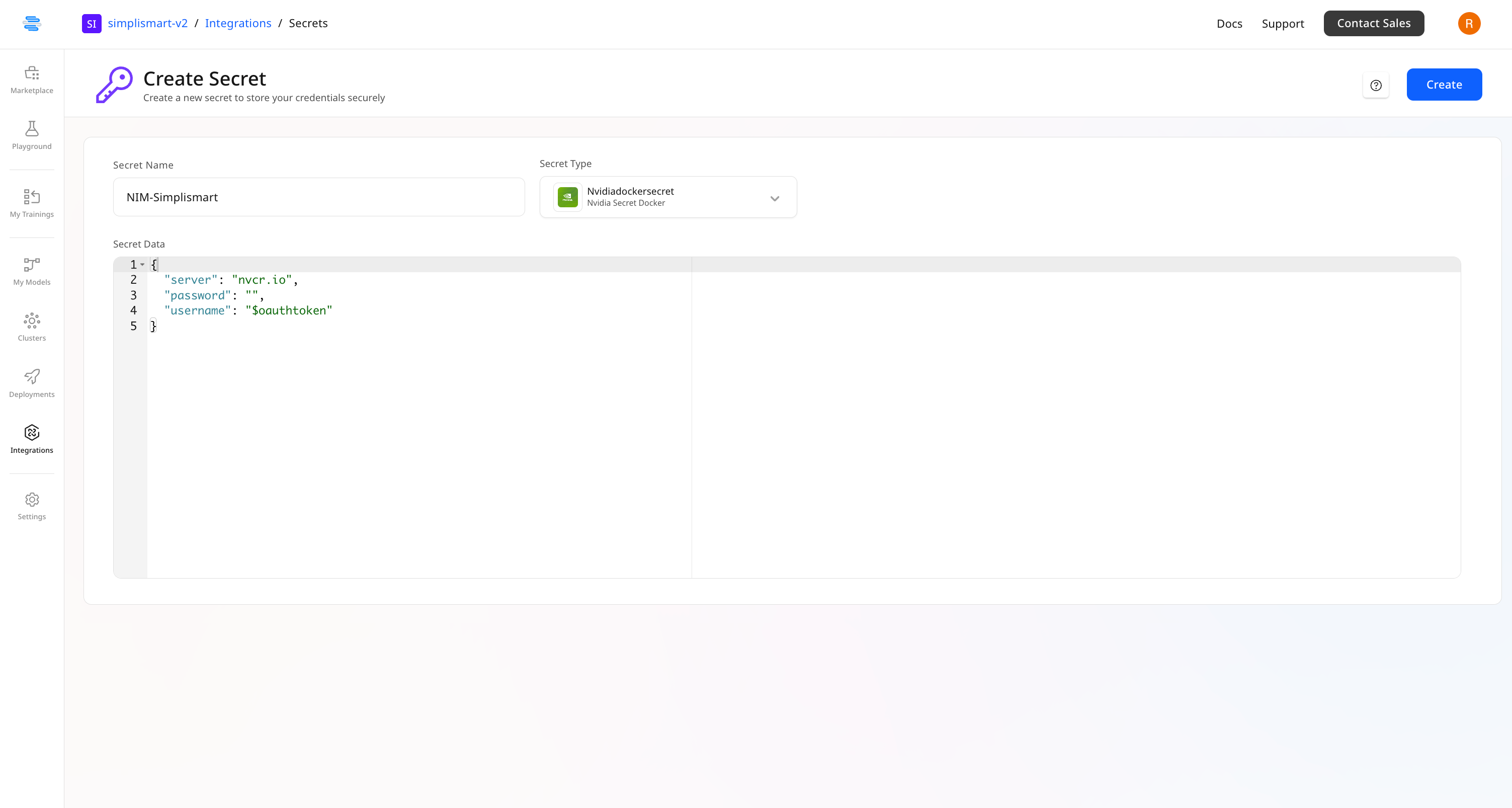 Once **NIM secrets** are added to your account, you can deploy models with just a few clicks and start using them within minutes.
***
### Deployment Process
#### 1. Access the Model Marketplace
Navigate to the Model Marketplace section.
#### 2. Filter for NIM Models
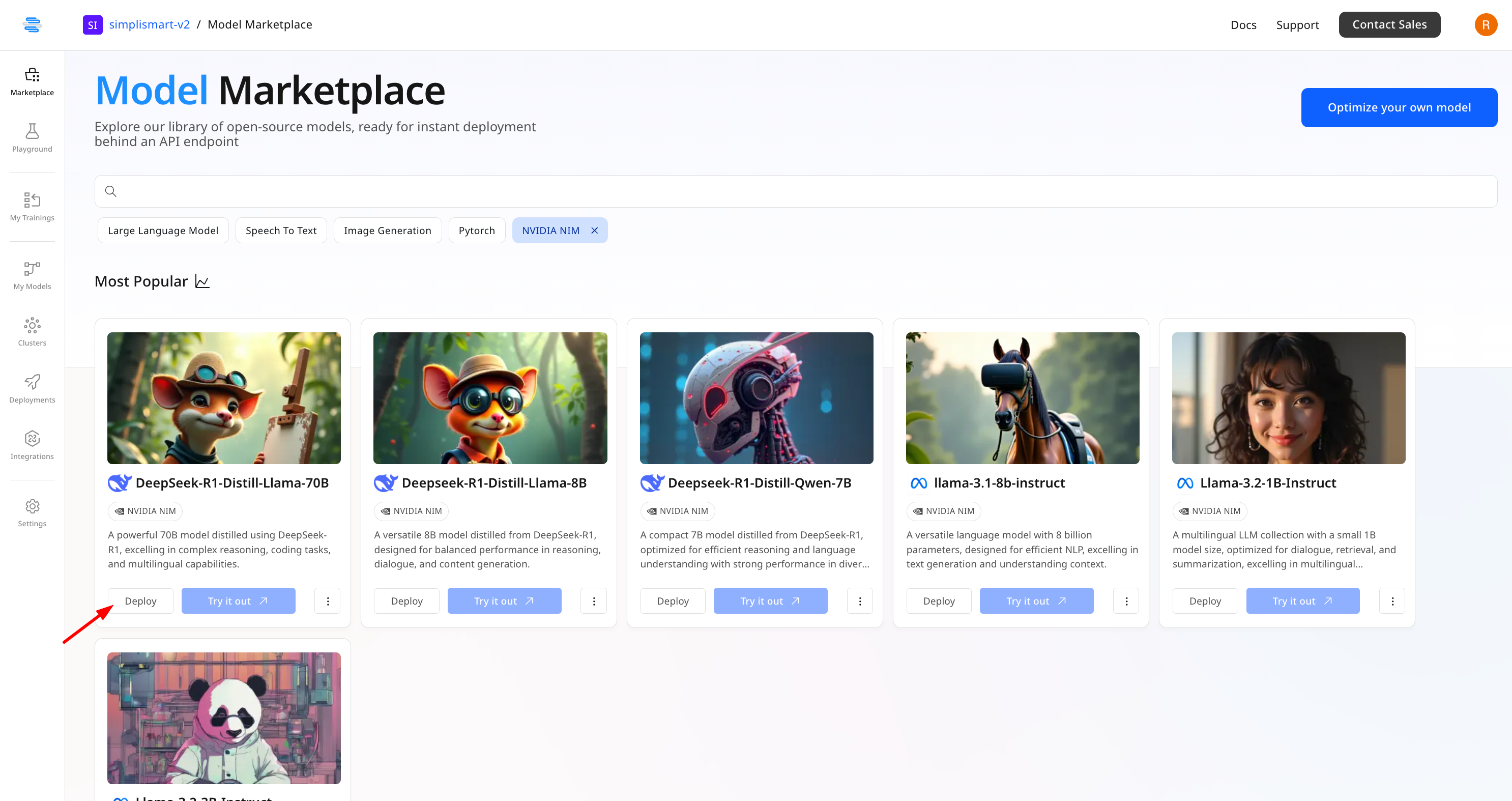
Click the **NIM** button to filter the marketplace to show only NVIDIA NIM models.
#### 3. Select a Model
Browse the available **NIM models** and select the one you wish to deploy. Each model is displayed as a card with relevant information.
#### 4. Initiate Deployment
Click the **Deploy** button on the model card. This will take you to the deployments page.
Once **NIM secrets** are added to your account, you can deploy models with just a few clicks and start using them within minutes.
***
### Deployment Process
#### 1. Access the Model Marketplace
Navigate to the Model Marketplace section.
#### 2. Filter for NIM Models
Click the **NIM** button to filter the marketplace to show only NVIDIA NIM models.
#### 3. Select a Model
Browse the available **NIM models** and select the one you wish to deploy. Each model is displayed as a card with relevant information.
#### 4. Initiate Deployment
Click the **Deploy** button on the model card. This will take you to the deployments page.
 #### 5. Configure Deployment Settings
On the deployments page, specify the following parameters:
* **Cluster**: Select the cluster where you want to deploy the model.
* **Node Group**: Choose the appropriate node group.
* **Cloud Secrets**: Select the NIM secret from the dropdown.
* **CPU Limits**: Set the CPU allocation for the model.
* **Memory Limits**: Set the memory allocation for the model.
* **Scaling Range**: Configure the auto-scaling parameters for the deployment.
#### 6. Complete Deployment
Click the **Add Deployment** button to initiate the deployment process.
#### 7. Deployment Completion
The model deployment process typically takes 10-15 minutes to complete. Once deployed, you can access the model through the provided endpoint.
***
### Using the Deployed Model
After successful deployment, you will be provided with an endpoint URL. Use this endpoint to make API calls to the deployed NIM model.
***
### Available NIM Models
The following NVIDIA NIM models are currently available for deployment:
* DeepSeek-R1-Distill-Llama-70B.
* Llama-3.2-3B-Instruct.
* llama-3.1-8b-instruct.
* Llama-3.2-1B-Instruct.
* Deepseek-R1-Distill-Qwen-7B.
* Deepseek-R1-Distill-Llama-8B.
#### 5. Configure Deployment Settings
On the deployments page, specify the following parameters:
* **Cluster**: Select the cluster where you want to deploy the model.
* **Node Group**: Choose the appropriate node group.
* **Cloud Secrets**: Select the NIM secret from the dropdown.
* **CPU Limits**: Set the CPU allocation for the model.
* **Memory Limits**: Set the memory allocation for the model.
* **Scaling Range**: Configure the auto-scaling parameters for the deployment.
#### 6. Complete Deployment
Click the **Add Deployment** button to initiate the deployment process.
#### 7. Deployment Completion
The model deployment process typically takes 10-15 minutes to complete. Once deployed, you can access the model through the provided endpoint.
***
### Using the Deployed Model
After successful deployment, you will be provided with an endpoint URL. Use this endpoint to make API calls to the deployed NIM model.
***
### Available NIM Models
The following NVIDIA NIM models are currently available for deployment:
* DeepSeek-R1-Distill-Llama-70B.
* Llama-3.2-3B-Instruct.
* llama-3.1-8b-instruct.
* Llama-3.2-1B-Instruct.
* Deepseek-R1-Distill-Qwen-7B.
* Deepseek-R1-Distill-Llama-8B.