> ## Documentation Index
> Fetch the complete documentation index at: https://docs.shaktistudio.ai/llms.txt
> Use this file to discover all available pages before exploring further.
# Optimise a Model
> End-to-end process for adding, configuring, and compiling a model on the platform.
This guide walks you through the **end-to-end process of adding, configuring, and compiling a model** on the platform.
## Enter Model Details
Navigate to **Add Model** to register a new model.
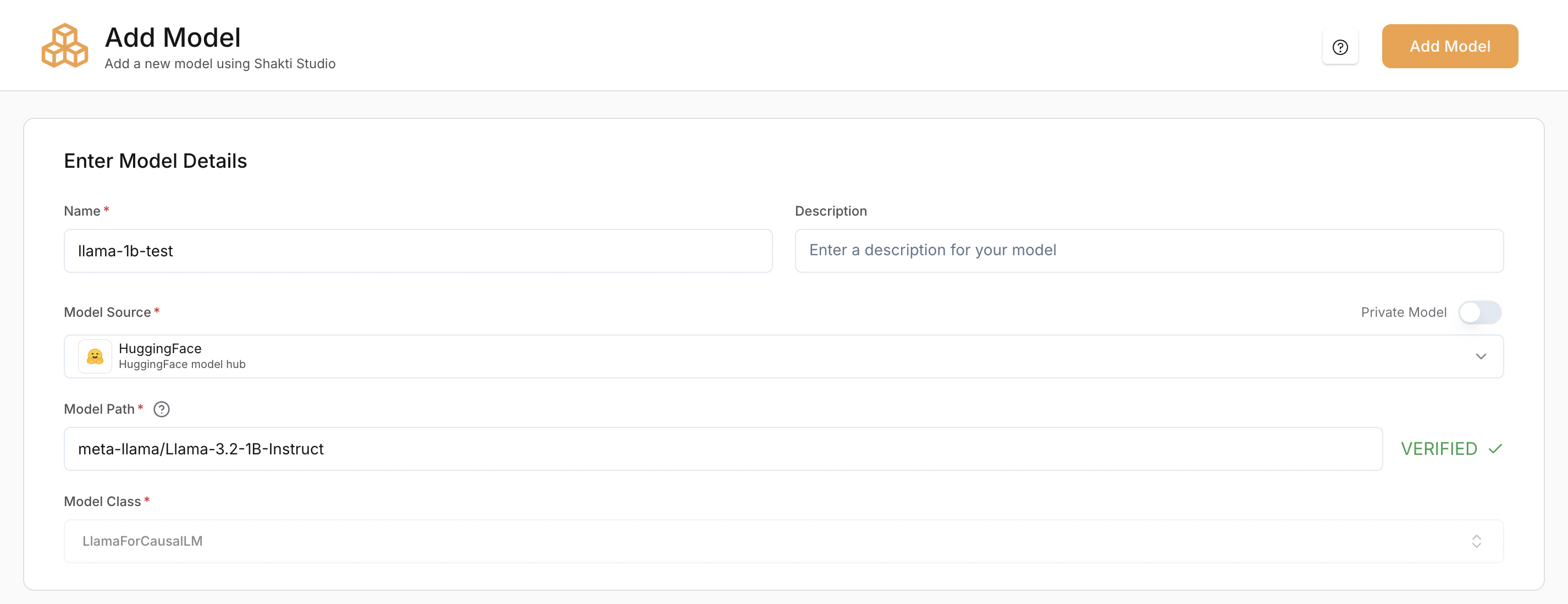 Models are scoped to the active workspace. Use the workspace toggle in the breadcrumb navigation to switch workspaces before importing or compiling a model. See [Workspaces](/model-suite/settings/workspaces) for details.
### Name (Required)
A unique identifier for the model within the platform.
### Description (Optional)
Short note about the model's purpose.
### Model Source (Required)
Specifies where the model artifacts are loaded from.
* **Hugging Face (HF)** – Load directly from the Hugging Face Hub
* **Shakti Studio S3** – Load from an S3 bucket
* **GCP GCS** – Load from a Google Cloud Storage bucket
* **Public URL** – Load from a publicly accessible URL
If using Hugging Face, you can enable **Private Model** for gated or private repositories.
If you use a **private model from Hugging Face**, add your **Hugging Face access token as a secret** on the platform first, then select the appropriate linked secret when configuring the model.
### Model Path (Required)
The exact path to the model.
* **Hugging Face:** `meta-llama/Llama-3.1-8B-Instruct`
* **AWS S3:** `s3://my-bucket/model/`
* **GCP GCS:** `gs://my-bucket/model/`
* **Public URL:** `https:///model`
The platform verifies the path automatically.
### Model Class (Required)
Defines the pipeline or architecture class used to load the model.
* `LlamaForCausalLM` → LLMs
* `WhisperForConditionalGeneration` → Speech models
* `FluxPipeline` → Diffusion models
* `CustomPipeline` → Custom or non-standard pipelines
This is usually auto-selected based on the model source and path.
## Optimising Infrastructure
This section determines **on which GPU the model will be deployed**.
Models are scoped to the active workspace. Use the workspace toggle in the breadcrumb navigation to switch workspaces before importing or compiling a model. See [Workspaces](/model-suite/settings/workspaces) for details.
### Name (Required)
A unique identifier for the model within the platform.
### Description (Optional)
Short note about the model's purpose.
### Model Source (Required)
Specifies where the model artifacts are loaded from.
* **Hugging Face (HF)** – Load directly from the Hugging Face Hub
* **Shakti Studio S3** – Load from an S3 bucket
* **GCP GCS** – Load from a Google Cloud Storage bucket
* **Public URL** – Load from a publicly accessible URL
If using Hugging Face, you can enable **Private Model** for gated or private repositories.
If you use a **private model from Hugging Face**, add your **Hugging Face access token as a secret** on the platform first, then select the appropriate linked secret when configuring the model.
### Model Path (Required)
The exact path to the model.
* **Hugging Face:** `meta-llama/Llama-3.1-8B-Instruct`
* **AWS S3:** `s3://my-bucket/model/`
* **GCP GCS:** `gs://my-bucket/model/`
* **Public URL:** `https:///model`
The platform verifies the path automatically.
### Model Class (Required)
Defines the pipeline or architecture class used to load the model.
* `LlamaForCausalLM` → LLMs
* `WhisperForConditionalGeneration` → Speech models
* `FluxPipeline` → Diffusion models
* `CustomPipeline` → Custom or non-standard pipelines
This is usually auto-selected based on the model source and path.
## Optimising Infrastructure
This section determines **on which GPU the model will be deployed**.
 Shakti Studio provides a fully managed environment where infrastructure is provisioned automatically.
**Accelerator options:**
* **L40S** – Recommended for most production speech workloads
* **H100** – Best for high-throughput or low-latency deployments
Pick an accelerator that matches your model size and latency requirements.
***
## Model-Specific Configuration
After **Model Details** and **Optimising Infrastructure**, the remaining configuration depends on the **type of model** you are adding. Different model types require additional or different settings:
* **LLMs** (Chat, Completion, Embedding)
* **Diffusion Models**
* **Speech (Whisper) Models**
***
### LLMs (Chat, Completion, Embedding)
By default, the platform automatically selects the most suitable compilation settings for LLMs based on the model architecture.
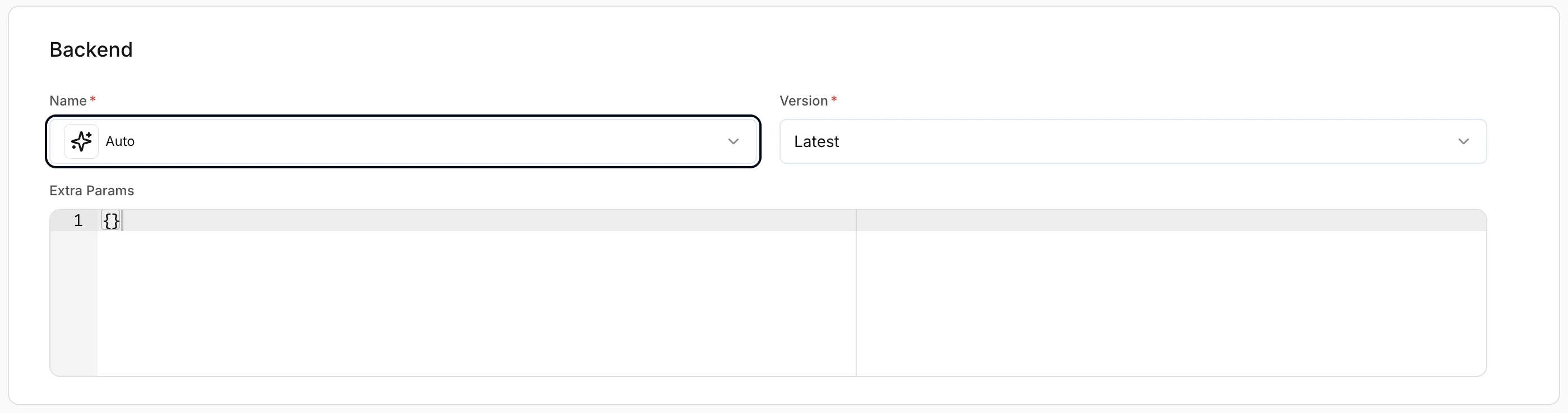
#### Backend Selection
Controls the inference backend used to serve the model. LLMs support multiple optimized backends.
* **Auto** – Platform selects the optimal backend automatically
* **Latest** – Recommended unless a specific version is required
For details, see the [LLM Optimization Guide](/guides/optimization-guide).
Shakti Studio provides a fully managed environment where infrastructure is provisioned automatically.
**Accelerator options:**
* **L40S** – Recommended for most production speech workloads
* **H100** – Best for high-throughput or low-latency deployments
Pick an accelerator that matches your model size and latency requirements.
***
## Model-Specific Configuration
After **Model Details** and **Optimising Infrastructure**, the remaining configuration depends on the **type of model** you are adding. Different model types require additional or different settings:
* **LLMs** (Chat, Completion, Embedding)
* **Diffusion Models**
* **Speech (Whisper) Models**
***
### LLMs (Chat, Completion, Embedding)
By default, the platform automatically selects the most suitable compilation settings for LLMs based on the model architecture.
#### Backend Selection
Controls the inference backend used to serve the model. LLMs support multiple optimized backends.
* **Auto** – Platform selects the optimal backend automatically
* **Latest** – Recommended unless a specific version is required
For details, see the [LLM Optimization Guide](/guides/optimization-guide).
 #### Quantization
**Precision Mode (Required)** controls how model weights are stored and computed. Choose the mode that balances accuracy, memory use, and throughput for your workload.
Available precision modes:
* **FLOAT16** – Half precision
* **FP8** – 8-bit floating point
* **INT8** – 8-bit integer
* **INT4** – 4-bit integer
* **BFLOAT16** – Brain floating point 16-bit
* **FLOAT32** – Full precision
* **AWQ** – Activation-aware Weight Quantization
* **MXFP4** – Mixed-precision 4-bit floating point
Lower precision (e.g. INT4, FP8) reduces memory and can increase throughput; higher precision (e.g. FLOAT32, BFLOAT16) preserves accuracy. Choose based on your latency and quality requirements.
#### Quantization
**Precision Mode (Required)** controls how model weights are stored and computed. Choose the mode that balances accuracy, memory use, and throughput for your workload.
Available precision modes:
* **FLOAT16** – Half precision
* **FP8** – 8-bit floating point
* **INT8** – 8-bit integer
* **INT4** – 4-bit integer
* **BFLOAT16** – Brain floating point 16-bit
* **FLOAT32** – Full precision
* **AWQ** – Activation-aware Weight Quantization
* **MXFP4** – Mixed-precision 4-bit floating point
Lower precision (e.g. INT4, FP8) reduces memory and can increase throughput; higher precision (e.g. FLOAT32, BFLOAT16) preserves accuracy. Choose based on your latency and quality requirements.
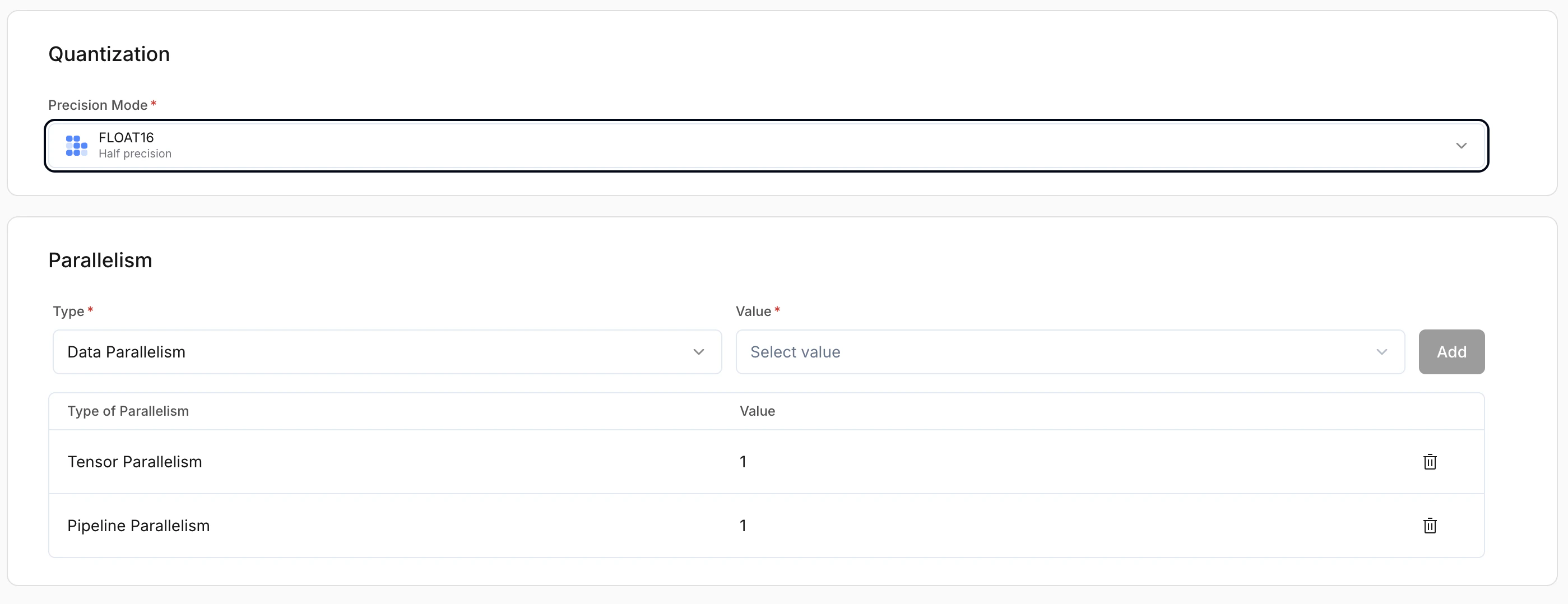 #### Parallelism
LLMs support:
* **Data Parallelism** – Replicates the full model across multiple GPUs; each GPU handles separate requests. Best for throughput and concurrent traffic.
* **Pipeline Parallelism** – Splits model layers across GPUs. Use when the model is too large to fit on a single GPU.
* **Expert Parallelism** – For Mixture-of-Experts (MoE) models; distributes experts across GPUs. Improves scalability and efficiency for MoE architectures.
#### Pipeline Task
Defines the task the model is used for.
* **Chat** – Conversational models
* **Completion** – Text generation
* **Embedding** – Vector generation models
This determines request/response formatting and runtime behaviour.
#### Speculative Decoding (Optional)
Improves latency by generating tokens using a draft strategy.
**Recommended:** On for chat and completion workloads.
#### Parallelism
LLMs support:
* **Data Parallelism** – Replicates the full model across multiple GPUs; each GPU handles separate requests. Best for throughput and concurrent traffic.
* **Pipeline Parallelism** – Splits model layers across GPUs. Use when the model is too large to fit on a single GPU.
* **Expert Parallelism** – For Mixture-of-Experts (MoE) models; distributes experts across GPUs. Improves scalability and efficiency for MoE architectures.
#### Pipeline Task
Defines the task the model is used for.
* **Chat** – Conversational models
* **Completion** – Text generation
* **Embedding** – Vector generation models
This determines request/response formatting and runtime behaviour.
#### Speculative Decoding (Optional)
Improves latency by generating tokens using a draft strategy.
**Recommended:** On for chat and completion workloads.
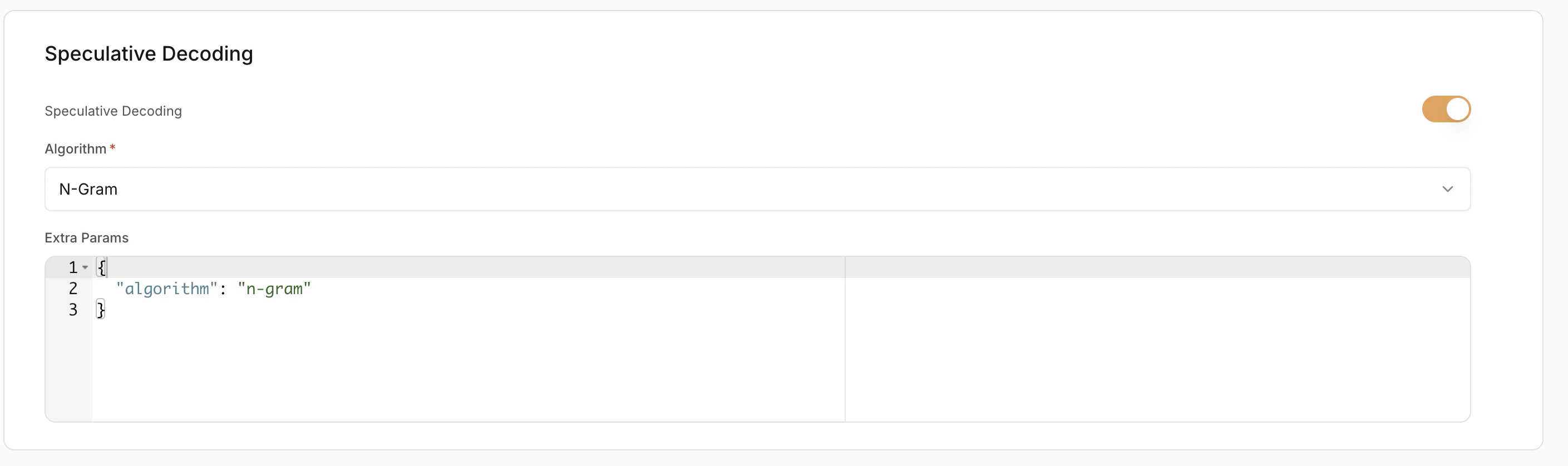 #### Extra Params
Advanced backend-specific configuration in JSON format. Leave empty unless you have custom tuning needs.
#### LoRA Configuration (Optional)
LoRA (Low-Rank Adaptation) allows loading fine-tuned adapters on top of base models.
* **Enable LoRA** – Toggle to enable or disable LoRA.
* **LoRA Config Method:**
* **Via LoRA List** – Use pre-registered LoRA adapters
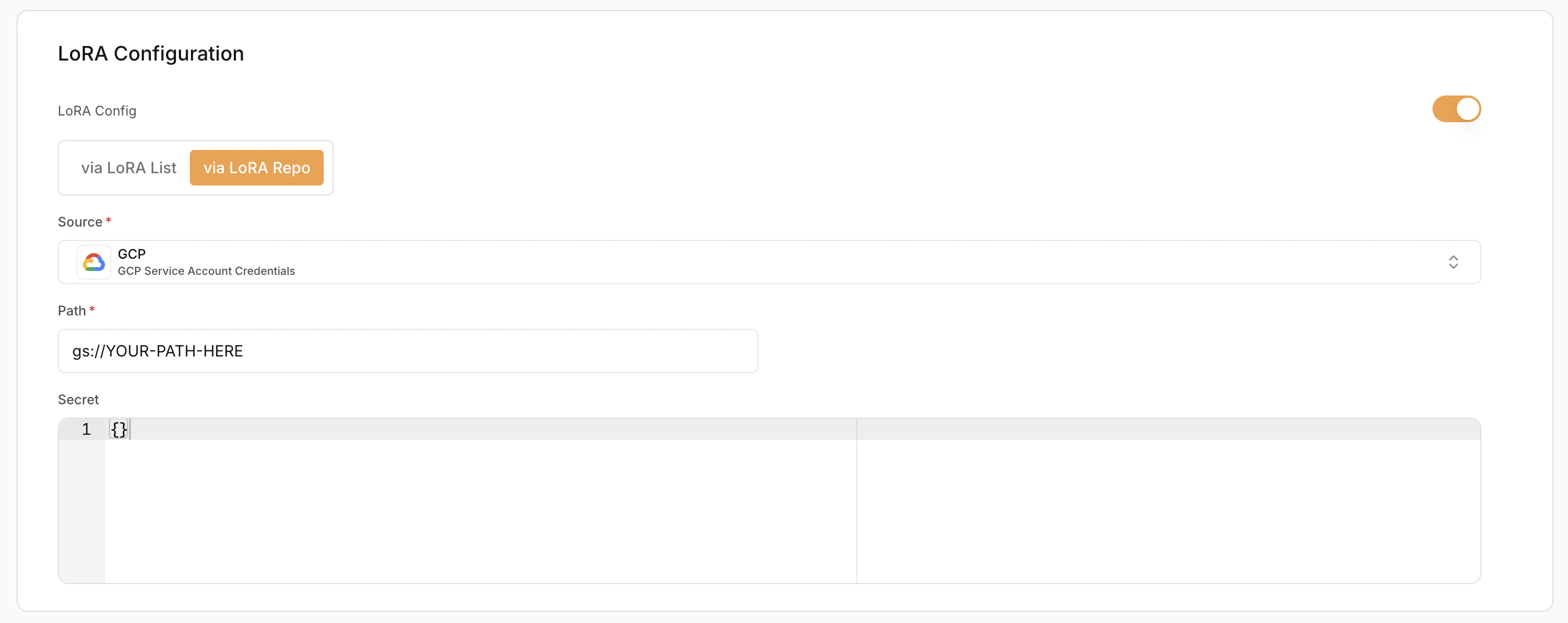
* **Via LoRA Repo** – Load directly from a repository
Use **Add LoRA Path** to attach multiple adapters if needed.
#### Extra Params
Advanced backend-specific configuration in JSON format. Leave empty unless you have custom tuning needs.
#### LoRA Configuration (Optional)
LoRA (Low-Rank Adaptation) allows loading fine-tuned adapters on top of base models.
* **Enable LoRA** – Toggle to enable or disable LoRA.
* **LoRA Config Method:**
* **Via LoRA List** – Use pre-registered LoRA adapters
* **Via LoRA Repo** – Load directly from a repository
Use **Add LoRA Path** to attach multiple adapters if needed.
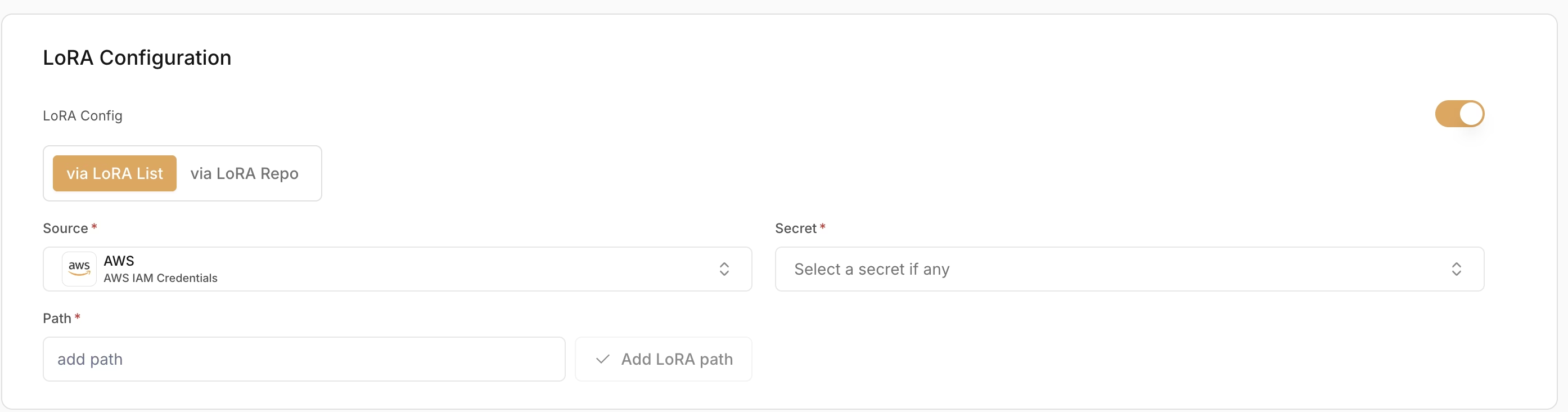 When adding a LoRA path:
* **Source (Required)** – Where the LoRA weights are stored (e.g. AWS (IAM Credentials))
* **Secret (Required)** – Credentials used to access the LoRA source
* **Path (Required)** – Path to the LoRA adapter location
When adding a LoRA path:
* **Source (Required)** – Where the LoRA weights are stored (e.g. AWS (IAM Credentials))
* **Secret (Required)** – Credentials used to access the LoRA source
* **Path (Required)** – Path to the LoRA adapter location
 ***
### Diffusion Models
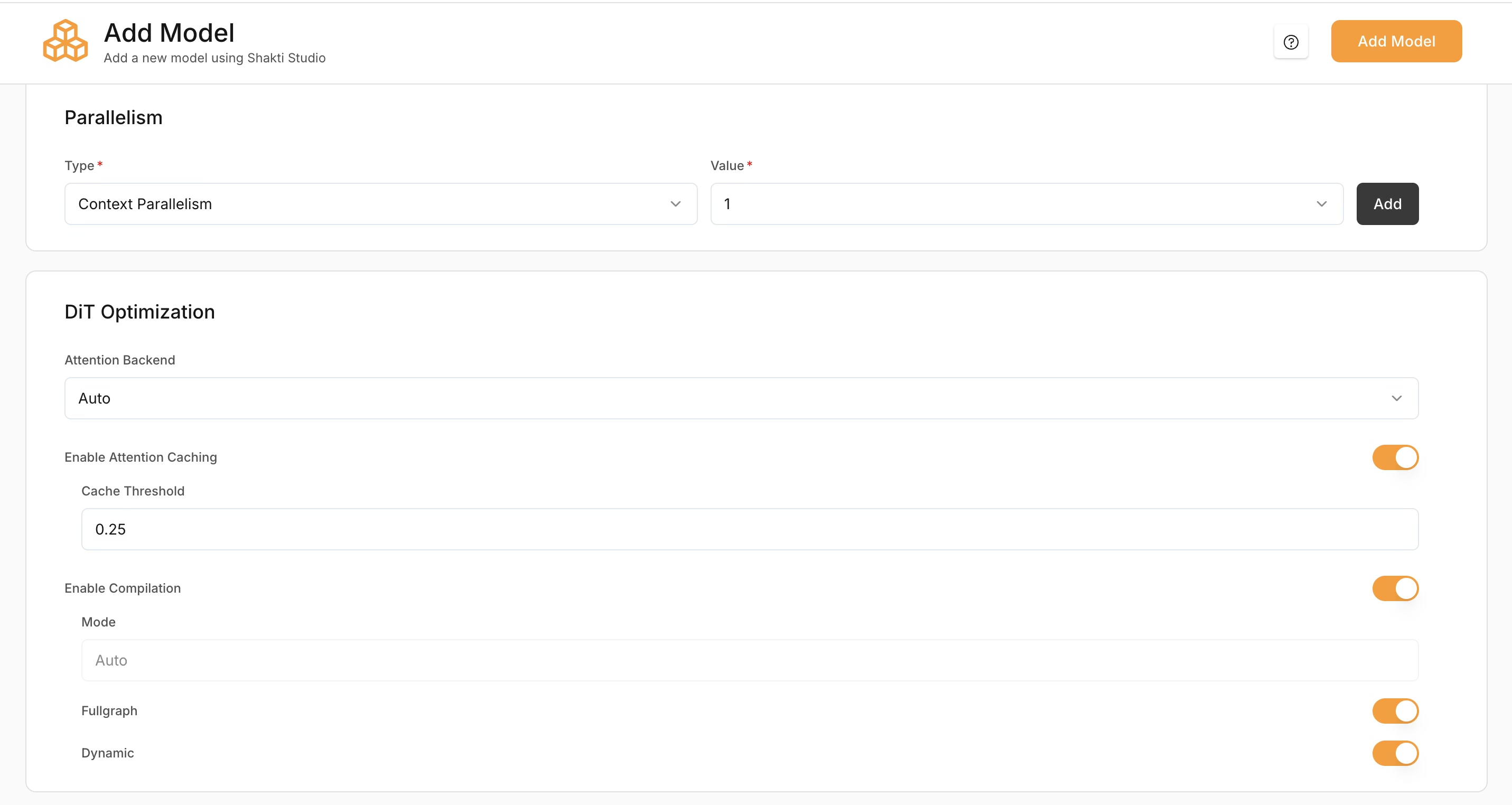
#### Parallelism
Diffusion models support:
* **Context Parallelism** – Splits the input context or latent representation across multiple GPUs. Useful for high-resolution image generation and memory-intensive models.
* **Fully Shared Data Parallelism** – Replicates the model across GPUs; each GPU handles separate requests. Useful for high-throughput production and concurrent image generation.
#### DiT Optimization
*(Applies only to diffusion models.)*
**Attention Backend** – Selects the attention implementation during inference.
* **Flash** – Optimized attention for better performance
* **Torch** – Standard PyTorch attention
* **Auto** – Automatically selects the best option
**Recommended:** Auto
#### Additional Optimisation Settings
* **Enable Attention Caching** – Caches attention states to reduce repeated computation and improve speed.
* **Cache Threshold** – Controls when caching is applied. Default: `0.25`. Higher values improve inference speed but may reduce output quality.
* **Enable Compilation** – Compiles the model graph for faster inference.
* **Fullgraph** – Compiles the entire model for maximum performance
* **Dynamic** – Supports variable input shapes
**Recommended:** Enable Fullgraph for stable production workloads.
***
### Diffusion Models
#### Parallelism
Diffusion models support:
* **Context Parallelism** – Splits the input context or latent representation across multiple GPUs. Useful for high-resolution image generation and memory-intensive models.
* **Fully Shared Data Parallelism** – Replicates the model across GPUs; each GPU handles separate requests. Useful for high-throughput production and concurrent image generation.
#### DiT Optimization
*(Applies only to diffusion models.)*
**Attention Backend** – Selects the attention implementation during inference.
* **Flash** – Optimized attention for better performance
* **Torch** – Standard PyTorch attention
* **Auto** – Automatically selects the best option
**Recommended:** Auto
#### Additional Optimisation Settings
* **Enable Attention Caching** – Caches attention states to reduce repeated computation and improve speed.
* **Cache Threshold** – Controls when caching is applied. Default: `0.25`. Higher values improve inference speed but may reduce output quality.
* **Enable Compilation** – Compiles the model graph for faster inference.
* **Fullgraph** – Compiles the entire model for maximum performance
* **Dynamic** – Supports variable input shapes
**Recommended:** Enable Fullgraph for stable production workloads.
 ***
### ASR (Speech) Models
***
### ASR (Speech) Models
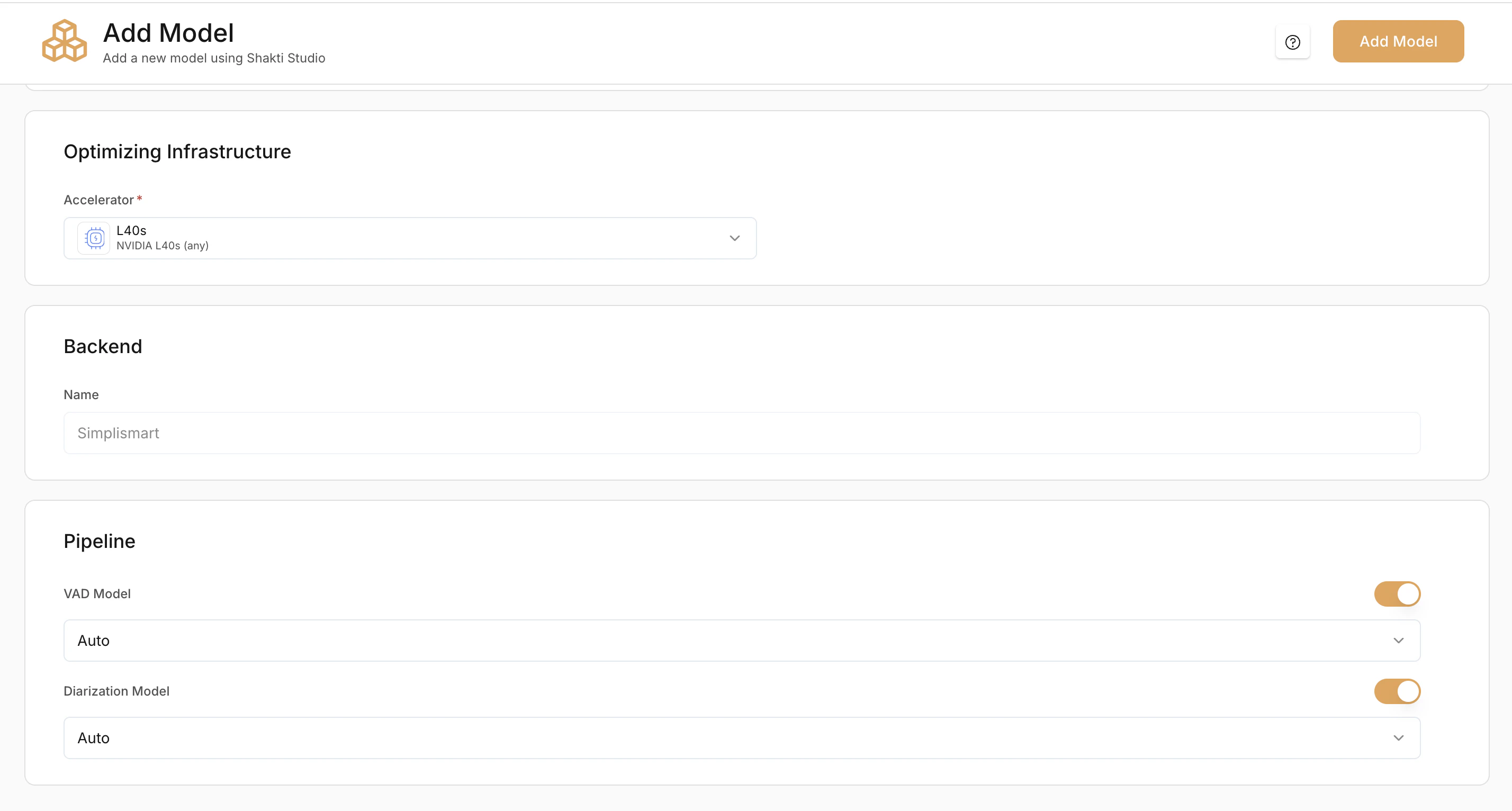 #### Optional Pipeline Add-ons
##### **Voice Activity Detection (VAD) Model**
Detects speech segments and removes silence before transcription.
**VAD options:**
* **Auto** – Platform selects the best VAD
* **Silero** – Lightweight and fast VAD model
* **Frame** – Frame-based detection
**Recommended:** Auto or Silero
##### **Diarization Model (Optional)**
Separates and labels different speakers in the audio.
Enable this if you need speaker-wise transcripts.
#### Optional Pipeline Add-ons
##### **Voice Activity Detection (VAD) Model**
Detects speech segments and removes silence before transcription.
**VAD options:**
* **Auto** – Platform selects the best VAD
* **Silero** – Lightweight and fast VAD model
* **Frame** – Frame-based detection
**Recommended:** Auto or Silero
##### **Diarization Model (Optional)**
Separates and labels different speakers in the audio.
Enable this if you need speaker-wise transcripts.