> ## Documentation Index
> Fetch the complete documentation index at: https://docs.shaktistudio.ai/llms.txt
> Use this file to discover all available pages before exploring further.
# Creating a Training Job
This updated guide provides an overview of our enhanced UI for training large language models and vision language models, supporting both **Supervised Fine-Tuning (SFT)** and **Reinforcement Learning with Human Feedback (RLHF)**. For each training type, you can choose between full-model fine-tuning or parameter-efficient approaches like LoRA.
While full-model fine-tuning is fully supported across both **SFT** and **RLHF**, we recommend using **LoRA** for most use cases due to its faster convergence, lower GPU memory usage, and simplified checkpointing.
## **Starting a Training Experiment**
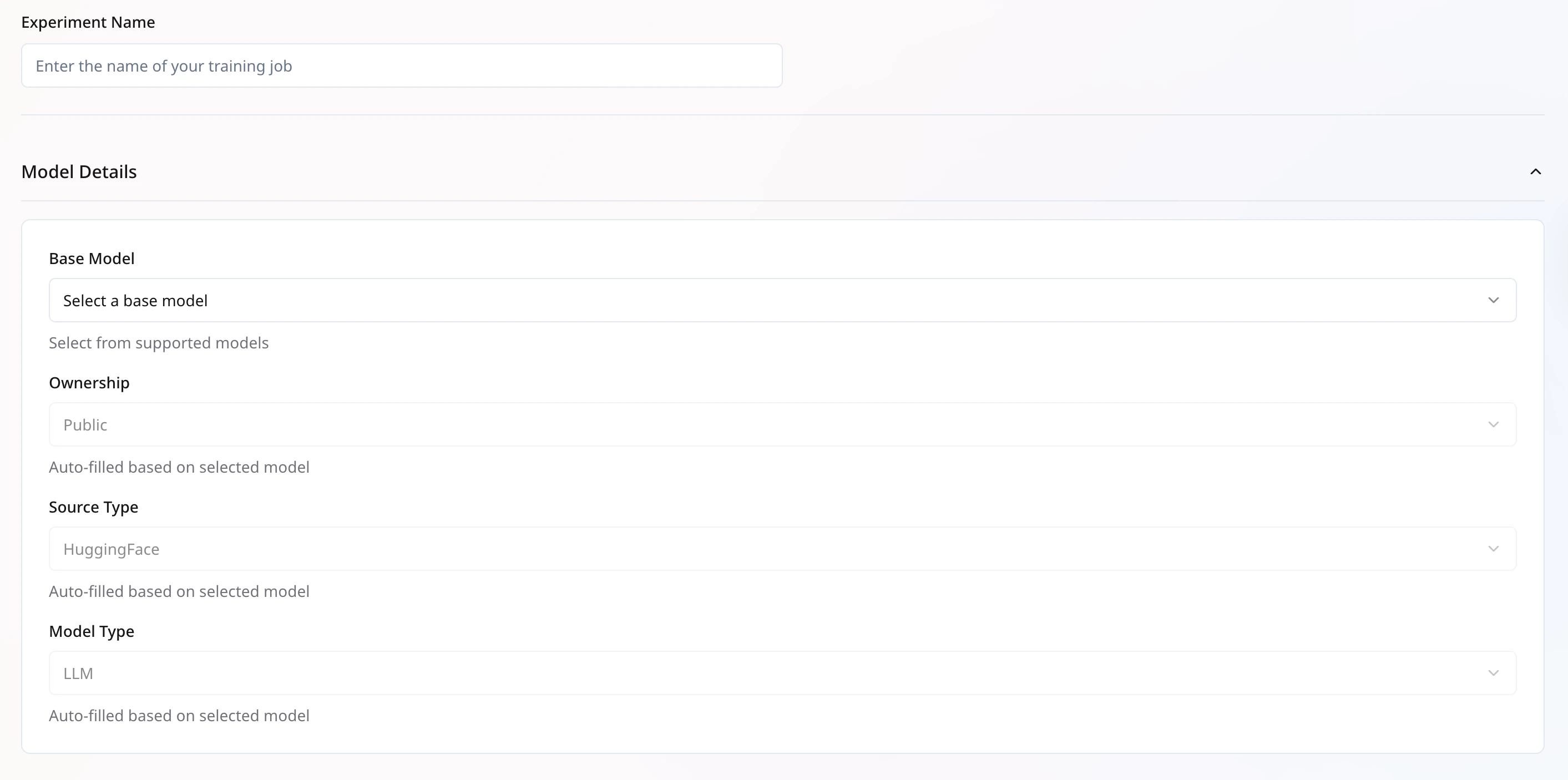
**Experiment Name**: A unique identifier for each training job within your organization.
### Model Details:
* **Base Model**: Select a supported model from the list below.
* **Source Type**: Currently supports models from Hugging Face.
* **Model Type**: Auto-filled based on the selected base model.
**Supported Models**:
* `meta-llama/Llama-3.1-8B-Instruct`
* `meta-llama/Llama-3.2-1B-Instruct`
* `meta-llama/Llama-3.2-3B-Instruct`
* `meta-llama/Llama-3.2-11B-Vision-Instruct`
* `Qwen/Qwen2.5-3B-Instruct`
* `Qwen/Qwen2.5-14B-Instruct`
* `Qwen/Qwen2.5-VL-7B-Instruct`
* `tiiuae/falcon-7b-instruct`
 **Note:**
* If you select **LLM** as the model type for a **VLM** base model, only the language component will be trained.
* To train the vision component, ensure both **base model** and **model type**are set to **VLM**.
## **Dataset Selection**
Configure your dataset for training using the following fields:
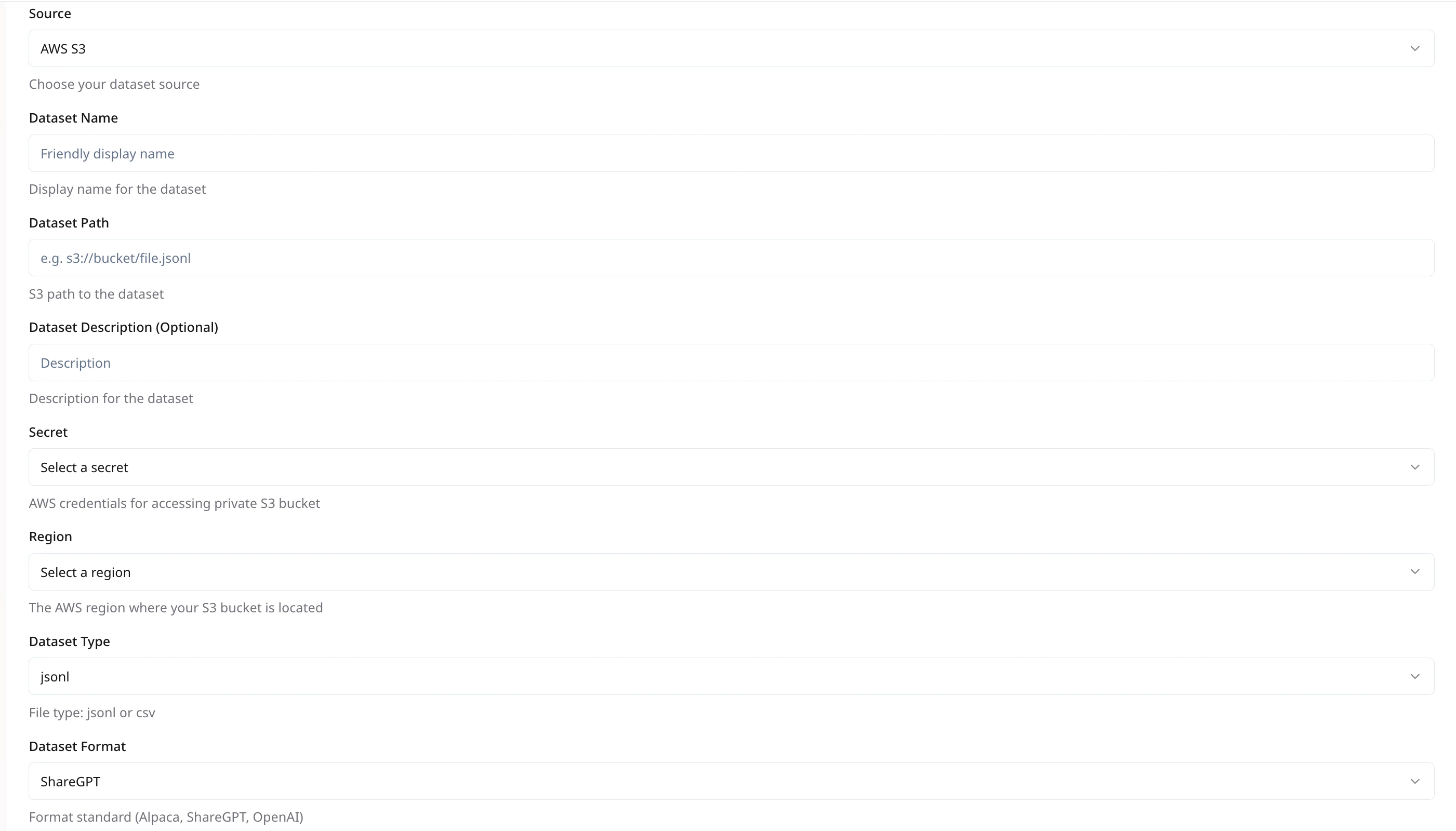
* **Source Options**: Select the source of your dataset. Supported options include
* Hugging Face (public Hub)
* AWS S3
* GCP Storage (GCS)
* **Dataset Name**\
This should be unique within your organization to help with organizing and reusing datasets.
* **Dataset Path**\
Specify the dataset location. For AWS S3 & GCP GCS, use the full path in the format.\
`e.g., s3://your-bucket/your-file.jsonl`
* **Dataset Description** *(Optional)*\
Provide a brief description of the dataset’s contents or purpose. Optional but useful for reference.
* **Secret** *(Required for AWS S3 or GCP GCS)*\
Provide your cloud credentials to enable secure access to private storage buckets.
* **Region** *(Required for AWS S3 or GCP GCS)*\
Select the region where your storage bucket is located.
## **Dataset Format**
We support **JSONL** format for all training data.
* For **VLM** models, use a **ZIP file** containing both the image files and a `train.jsonl` file (the master training file).
The directory should be archived in a `.zip` file and stored in an object storage. \
Example zip command:`cd path/to/dataset_dir && zip -r dataset_dir.zip ./*`
Each line in a `.jsonl` file should represent a complete training example. The supported format styles are:
1. **ShareGPT Format**
```json theme={null}
{
"system": "",
"conversation": [
{"human": "", "assistant": ""},
{"human": "", "assistant": ""}
]
}
```
2. **OpenAI SFT Format**
```json theme={null}
{
"messages": [
{"role": "system", "content": ""},
{"role": "user", "content": ""},
{"role": "assistant", "content": ""},
{"role": "user", "content": ""},
{"role": "assistant", "content": ""}
]
}
```
3. **OpenAI DPO Format** *(for preference training)*
```json theme={null}
{
"messages": [
{"role": "system", "content": "You are a useful and harmless assistant"},
{"role": "user", "content": "Tell me tomorrow's weather"},
{"role": "assistant", "content": "Tomorrow's weather will be sunny"}
],
"rejected_response": "I don't know"
}
```
***
**Note:**
* If you select **LLM** as the model type for a **VLM** base model, only the language component will be trained.
* To train the vision component, ensure both **base model** and **model type**are set to **VLM**.
## **Dataset Selection**
Configure your dataset for training using the following fields:
* **Source Options**: Select the source of your dataset. Supported options include
* Hugging Face (public Hub)
* AWS S3
* GCP Storage (GCS)
* **Dataset Name**\
This should be unique within your organization to help with organizing and reusing datasets.
* **Dataset Path**\
Specify the dataset location. For AWS S3 & GCP GCS, use the full path in the format.\
`e.g., s3://your-bucket/your-file.jsonl`
* **Dataset Description** *(Optional)*\
Provide a brief description of the dataset’s contents or purpose. Optional but useful for reference.
* **Secret** *(Required for AWS S3 or GCP GCS)*\
Provide your cloud credentials to enable secure access to private storage buckets.
* **Region** *(Required for AWS S3 or GCP GCS)*\
Select the region where your storage bucket is located.
## **Dataset Format**
We support **JSONL** format for all training data.
* For **VLM** models, use a **ZIP file** containing both the image files and a `train.jsonl` file (the master training file).
The directory should be archived in a `.zip` file and stored in an object storage. \
Example zip command:`cd path/to/dataset_dir && zip -r dataset_dir.zip ./*`
Each line in a `.jsonl` file should represent a complete training example. The supported format styles are:
1. **ShareGPT Format**
```json theme={null}
{
"system": "",
"conversation": [
{"human": "", "assistant": ""},
{"human": "", "assistant": ""}
]
}
```
2. **OpenAI SFT Format**
```json theme={null}
{
"messages": [
{"role": "system", "content": ""},
{"role": "user", "content": ""},
{"role": "assistant", "content": ""},
{"role": "user", "content": ""},
{"role": "assistant", "content": ""}
]
}
```
3. **OpenAI DPO Format** *(for preference training)*
```json theme={null}
{
"messages": [
{"role": "system", "content": "You are a useful and harmless assistant"},
{"role": "user", "content": "Tell me tomorrow's weather"},
{"role": "assistant", "content": "Tomorrow's weather will be sunny"}
],
"rejected_response": "I don't know"
}
```
***
 ## **Dataset Configuration**
* **Lazy Tokenize**: Delay tokenization until needed. Speeds up dataset loading for large files.
* **Streaming**: Enable only for public HF Datasets to load records on-the-fly, reducing local storage needs.
* **Prompt Max Length**: Maximum token length for prompt. Longer sequences will be truncated.
> **Recommended:** 2048
* **System Prompt**: *(Optional)* A global prefix to every example, e.g., `You are a helpful assistant.`
* **Prompt Template**: *(Optional)* If your data needs wrapping in a custom template, e.g., ` {system_prompt} {prompt}`.
* **Train/Validation Split**: Percentage (fraction) for splitting your `.jsonl` into training and validation sets.
* **Split Type**\
Currently, only **random split** is supported. The dataset will be randomly divided into training and validation sets.
* **Train Split Ratio**\
Enter the ratio of data to be used for training (e.g., `0.9` for 90%).
* **Validation Split Ratio**\
Enter the ratio of data to be used for validation (e.g., `0.1` for 10%).
**Train Split Ratio** should be greater than **0.8**
## **Infrastructure Configuration**
* **GPU Type**: Select instance GPU, e.g., `H100`, `L40s`.
* **GPU Count**: Number of GPUs to allocate for this job.
Adjust based on model size and dataset scale. More GPUs reduce wall-clock time but increase cost.
## **Dataset Configuration**
* **Lazy Tokenize**: Delay tokenization until needed. Speeds up dataset loading for large files.
* **Streaming**: Enable only for public HF Datasets to load records on-the-fly, reducing local storage needs.
* **Prompt Max Length**: Maximum token length for prompt. Longer sequences will be truncated.
> **Recommended:** 2048
* **System Prompt**: *(Optional)* A global prefix to every example, e.g., `You are a helpful assistant.`
* **Prompt Template**: *(Optional)* If your data needs wrapping in a custom template, e.g., ` {system_prompt} {prompt}`.
* **Train/Validation Split**: Percentage (fraction) for splitting your `.jsonl` into training and validation sets.
* **Split Type**\
Currently, only **random split** is supported. The dataset will be randomly divided into training and validation sets.
* **Train Split Ratio**\
Enter the ratio of data to be used for training (e.g., `0.9` for 90%).
* **Validation Split Ratio**\
Enter the ratio of data to be used for validation (e.g., `0.1` for 10%).
**Train Split Ratio** should be greater than **0.8**
## **Infrastructure Configuration**
* **GPU Type**: Select instance GPU, e.g., `H100`, `L40s`.
* **GPU Count**: Number of GPUs to allocate for this job.
Adjust based on model size and dataset scale. More GPUs reduce wall-clock time but increase cost.
 ***
## **Training Configuration**
1. **Core Options**
| **Parameter** | **Description** | **Example** |
| :--------------- | :----------------------------- | :------------- |
| **Train Type** | Select the tuning algorithm | `SFT` |
| **Adapter Type** | Choose adapter method | `LoRA`, `Full` |
| **Torch DType** | Precision setting for training | `bfloat16` |
**Adapter Type**
* **Full** – Use this option for full-model fine-tuning, where all model parameters are updated.
* **LoRA** – Use this for parameter-efficient fine-tuning using Low-Rank Adapters (LoRA), which updates a small subset of weights for faster training and lower resource usage.
> ***Note***: *LoRA is generally recommended for efficiency and ease of deployment.*
***
## **Training Configuration**
1. **Core Options**
| **Parameter** | **Description** | **Example** |
| :--------------- | :----------------------------- | :------------- |
| **Train Type** | Select the tuning algorithm | `SFT` |
| **Adapter Type** | Choose adapter method | `LoRA`, `Full` |
| **Torch DType** | Precision setting for training | `bfloat16` |
**Adapter Type**
* **Full** – Use this option for full-model fine-tuning, where all model parameters are updated.
* **LoRA** – Use this for parameter-efficient fine-tuning using Low-Rank Adapters (LoRA), which updates a small subset of weights for faster training and lower resource usage.
> ***Note***: *LoRA is generally recommended for efficiency and ease of deployment.*
 2. ***RLHF Configuration (Applicable only for RLHF Training type)***
When selecting **Training Type = RLHF**, additional configuration fields appear under **RLHF Config**. These vary depending on the chosen **RLHF Type**. The platform supports the following RLHF variants:
* **DPO (Direct Preference Optimization)**
* **Beta**\
Controls the trade-off between preference loss and KL regularization.\
**Default:** `0.3`\
**Optional:** Yes, but recommended.
* **GRPO (Generative Rollouts with Preference Optimization)**
* **Beta**\
Similar to DPO, this governs the preference vs. KL loss balance.\
**Default:** `0.3`
* **Max Num Seqs**\
Number of sequences to use during rollout.\
**Default:** `16`\
**Optional:** Yes
* **Enforce Eager**\
If enabled, forces rollouts to run in eager mode rather than compiled mode. Useful for debugging or compatibility issues.\
**Default:** Unchecked
* **Common Parameters:**
| **Field** | **Description** | **Required** | **Default** |
| --------------- | ----------------------------------------------------- | ------------ | ----------- |
| RLHF Type | Select the RLHF variant to use | ✅ | - |
| Reference Model | Path to the baseline model used for KL regularization | ✅ | - |
| Reward Model | Path to the reward mode | Optional | - |
3. **Optimization Hyperparameters**
| **Parameter** | **Description** | **Default**
2. ***RLHF Configuration (Applicable only for RLHF Training type)***
When selecting **Training Type = RLHF**, additional configuration fields appear under **RLHF Config**. These vary depending on the chosen **RLHF Type**. The platform supports the following RLHF variants:
* **DPO (Direct Preference Optimization)**
* **Beta**\
Controls the trade-off between preference loss and KL regularization.\
**Default:** `0.3`\
**Optional:** Yes, but recommended.
* **GRPO (Generative Rollouts with Preference Optimization)**
* **Beta**\
Similar to DPO, this governs the preference vs. KL loss balance.\
**Default:** `0.3`
* **Max Num Seqs**\
Number of sequences to use during rollout.\
**Default:** `16`\
**Optional:** Yes
* **Enforce Eager**\
If enabled, forces rollouts to run in eager mode rather than compiled mode. Useful for debugging or compatibility issues.\
**Default:** Unchecked
* **Common Parameters:**
| **Field** | **Description** | **Required** | **Default** |
| --------------- | ----------------------------------------------------- | ------------ | ----------- |
| RLHF Type | Select the RLHF variant to use | ✅ | - |
| Reference Model | Path to the baseline model used for KL regularization | ✅ | - |
| Reward Model | Path to the reward mode | Optional | - |
3. **Optimization Hyperparameters**
| **Parameter** | **Description** | **Default**
**Values** | **Recommended Values** | **Permissible Range** |
| -------------------------- | ----------------------------------------- | --------------------------- | ---------------------- | --------------------- |
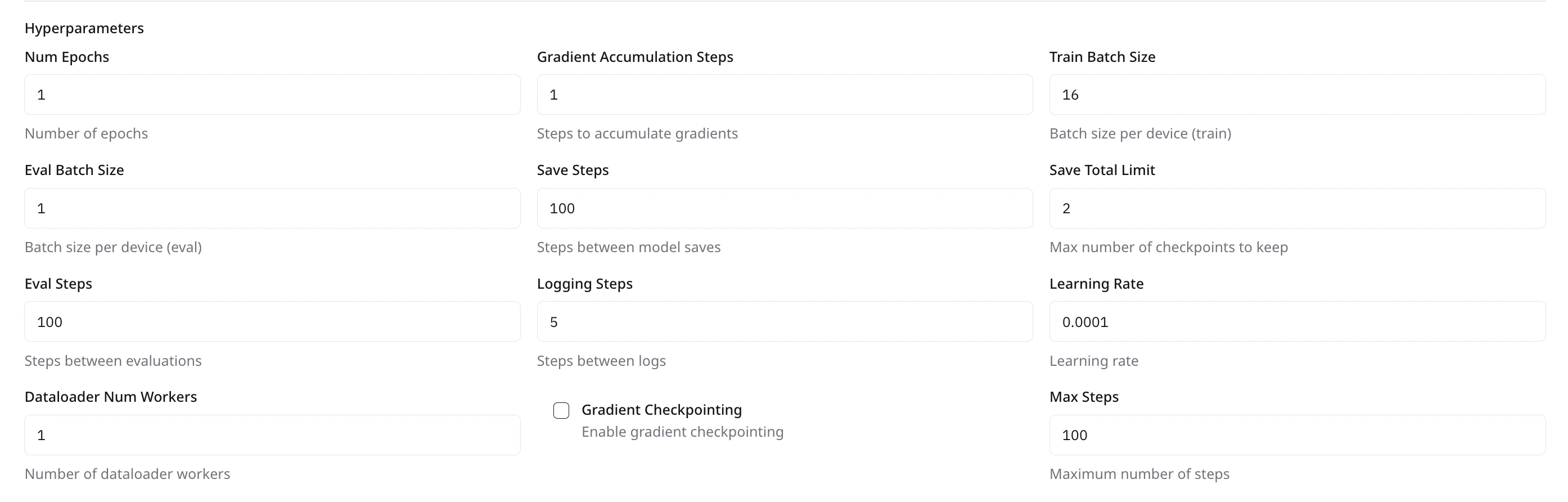
| **Num Epochs** | Number of full passes through the dataset | `1` | `2-5` | `50` |
| **Train Batch Size** | Samples per device for training | `8` | `8` | `16` |
| **Eval Batch Size** | Samples per device for evaluation | `1` | `8` | ` 16` |
| **Learning Rate** | Initial learning rate for optimizer | `0.0001` | `1×10⁻⁵ to 2×10⁻⁵` | \< `5×10⁻⁵` |
| **Dataloader Num Workers** | Parallel data-loading threads per device | `1` | `4` | `<10` |
These values are highly dependent on your GPU count. The provided defaults are optimized for setups with 8 GPUs and are suitable for models in the **3B–5B** parameter range. Adjust accordingly based on your GPU configuration.\
\
For larger models, consider reducing the batch size to avoid **out-of-memory issues**.\
\
**Example:** For an 8B model, we recommend using a **train batch size** and **eval batch size** of **4** each.\
(**`Note: this configuration works with DeepSpeed Zero3_Offload)`**
3. **Checkpointing & Monitoring**
| **Parameter** | **Description** | **Default** | **Recommended Values** | **Permissible Range** |
| -------------------- | ------------------------------------------------------------- | ----------- | ---------------------- | --------------------- |
| **Save Steps** | Interval (in steps) between saving model checkpoints. | `100` | `100` | `<= Max Steps` |
| **Save Total Limit** | Max number of checkpoints to keep locally. | `2` | `2-5` | `<10` |
| **Eval Steps** | Interval (in steps) between running evaluation loop. | `100` | `100 ` | `100 - 200` |
| **Logging Steps** | Interval (in steps) between logging metrics to the dashboard. | `5` | `5` | `< 20` |
 ***
## **LoRA Adapter Configuration**
| **Parameter** | **Description** | **Default** | **Recommended Value** | **Permissible Range** |
| ------------- | ------------------------------------------------------ | ------------ | --------------------- | --------------------- |
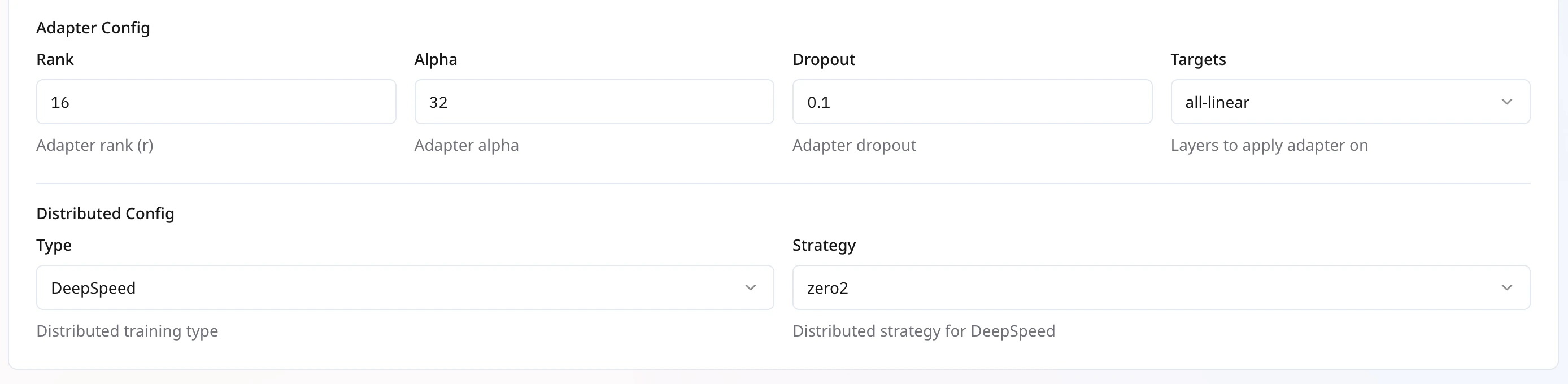
| **Rank (r)** | Dimensionality of the low-rank decomposition. | `16` | `16` | `64` |
| **Alpha** | Scaling factor for the adapter output. | `16` | `32` | `64` |
| **Dropout** | Dropout probability for adapter layers. | `0.1` | `0.1` | `1` |
| **Targets** | Which modules to apply adapters to (e.g., all-linear). | `all-linear` | `all-linear` | `NA` |
These settings control the LoRA injection into your base model. Higher rank increases capacity but uses more memory.
***
## **LoRA Adapter Configuration**
| **Parameter** | **Description** | **Default** | **Recommended Value** | **Permissible Range** |
| ------------- | ------------------------------------------------------ | ------------ | --------------------- | --------------------- |
| **Rank (r)** | Dimensionality of the low-rank decomposition. | `16` | `16` | `64` |
| **Alpha** | Scaling factor for the adapter output. | `16` | `32` | `64` |
| **Dropout** | Dropout probability for adapter layers. | `0.1` | `0.1` | `1` |
| **Targets** | Which modules to apply adapters to (e.g., all-linear). | `all-linear` | `all-linear` | `NA` |
These settings control the LoRA injection into your base model. Higher rank increases capacity but uses more memory.
 ***
## **Distributed Training Configuration**
| **Parameter** | **Description** | **Default** | **Recommended Value** | **Available Options** |
| :------------ | :------------------------------ | :-------------- | :-------------------- | :------------------------------------------------------------------------------ |
| **Type** | Choose your distributed backend | `DeepSpeed` | `DeepSpeed` | `DeepSpeed`, `DDP` |
| **Strategy** | Only available for deepseed | `zero3_offload` | `zero3_offload` | `zero1`,
***
## **Distributed Training Configuration**
| **Parameter** | **Description** | **Default** | **Recommended Value** | **Available Options** |
| :------------ | :------------------------------ | :-------------- | :-------------------- | :------------------------------------------------------------------------------ |
| **Type** | Choose your distributed backend | `DeepSpeed` | `DeepSpeed` | `DeepSpeed`, `DDP` |
| **Strategy** | Only available for deepseed | `zero3_offload` | `zero3_offload` | `zero1`,
`zero2`,
`zero2_offload`,
`zero3`,
`zero3_offload` |
Set **Type** to `DeepSpeed` to enable ZeRO optimizations, or `DDP` for native PyTorch distributed training.
\
When using DeepSpeed, select the `zero3_offload` strategy to maximize memory savings by offloading optimizer states to CPU/GPU.
 ***
## **Launching Your Job**
1. **Review** all settings.
2. Click **Create Job**.
3. Monitor progress under **My Trainings** > **Your Training Job** > **Metrics** .
4. Compile the model and deploy when training completes.
***
***
## **Launching Your Job**
1. **Review** all settings.
2. Click **Create Job**.
3. Monitor progress under **My Trainings** > **Your Training Job** > **Metrics** .
4. Compile the model and deploy when training completes.
***